
For salon owners
Stop running your salon across five apps.
Booking, till, retail, memberships, staff and every location in one system — with the reporting to see what’s actually working.
app.salondesk.net
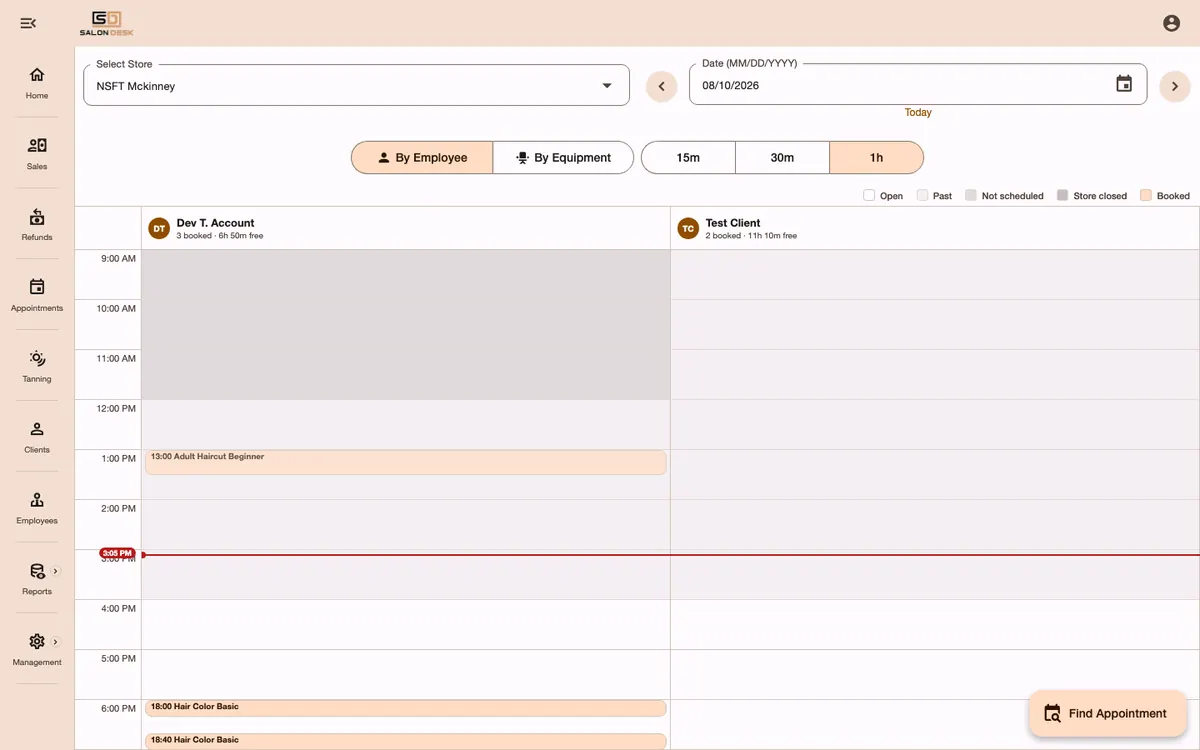
The book
A calendar that knows your floor
- View the day by employee or by equipment, at 15-minute, 30-minute or hourly resolution.
- Switch between locations from the same screen.
- Find Appointment searches for the next slot that satisfies staff, equipment and service rules at once.
- Open, past, unscheduled, closed and booked states are colour-coded at a glance.
Your team
Staff, shifts and what they're allowed to touch
- Schedules per location — the same person can work Tuesdays at one shop and weekends at another.
- Roles and permissions control who sees reports, who can refund, who can change pricing.
- Employee groups let a service require, say, a senior colourist rather than anyone with a chair — and charge for the request, collected the same way as everything else.
- Digital invites get new staff onto the system without a paper form.
app.salondesk.net

app.salondesk.net

Retail
The shelf pays for itself
- Mass-import from a manufacturer database instead of typing SKUs.
- Inventory, pricing and transaction history tracked per store.
- Barcode scanning at checkout, and online product sales for clients at home.
- Sale pricing with date ranges, so a promo ends on its own.
Switching
What the first week looks like
Day 1
Tell it what you do
Select your business types. The wizard drafts a starter menu of services, packages and memberships.
Day 1
Import your shelf
Pull your retail lines from the brand database and set stock levels.
Day 2
Add staff & hours
Send digital invites, set schedules and store hours per location, assign permissions.
Day 3
Open the book
Turn on online booking and start taking appointments and deposits.
Bring your messiest service.
The one with processing time, a specific bed, a deposit and a different price at your second location. We’ll build it live on the call.
 English (United States)
 English (UK)
 English (Canada)
 English (New Zealand)
 English (South Africa)
 French (Canada)
 French (France)
 German
 Spanish (Mexico)
 Spanish (Spain)