Tanning salon software that knows an open bed isn't a ready bed.
Bed status, timer control, spray booths, levels, waitlists and point of sale in one system — built for salons where the floor changes minute by minute.
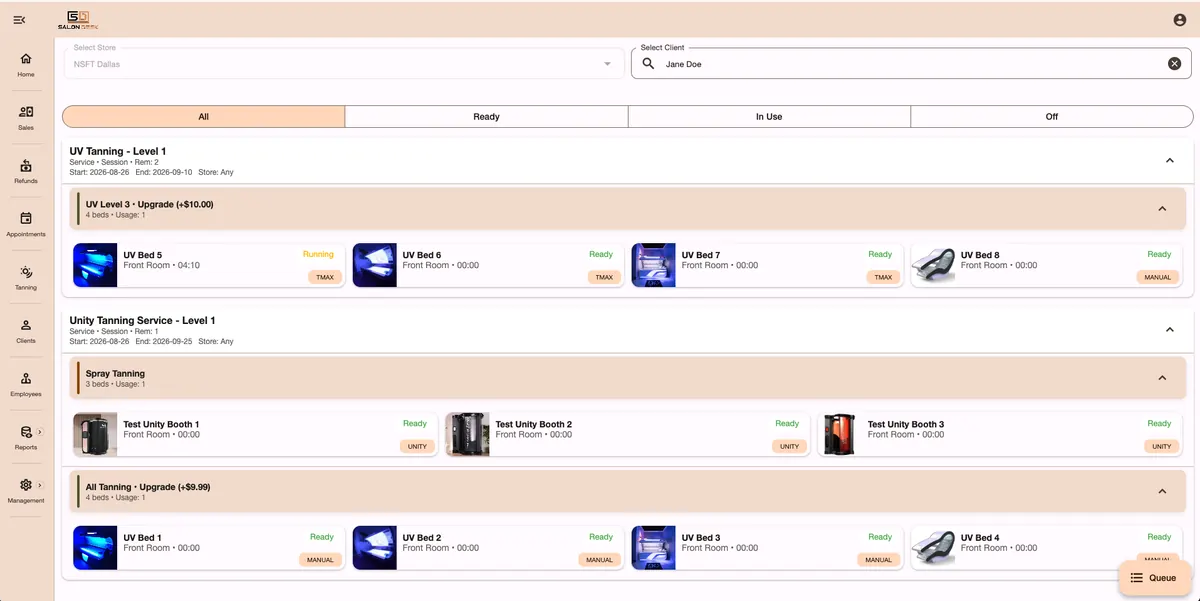
The booth is configured before it starts.
Session type, tan level, bronzers and scents are chosen at the desk and sent to the unit, so the booth runs what was actually sold and the add-on total lands on the ticket.
- Pick tan, WellFit or both, with estimated duration updating as options change.
- Bronzers and scents are priced add-ons, counted against per-session limits.
- Start, clear or stop the unit from the same panel — or send the client to the waiting list if it is busy.
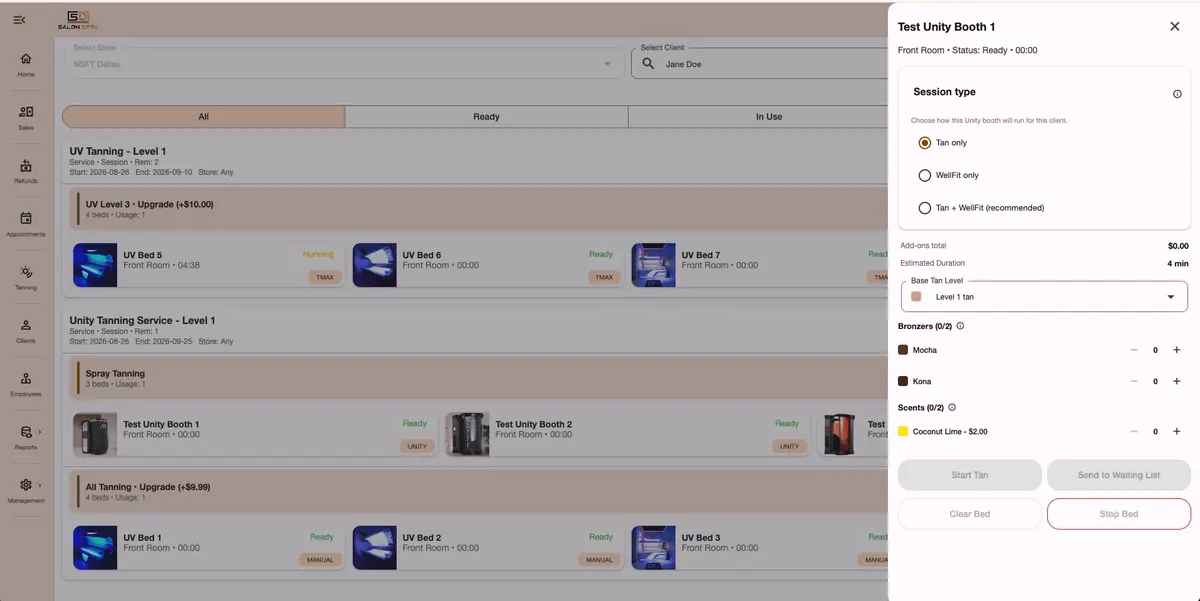
The right client, on the right bed.
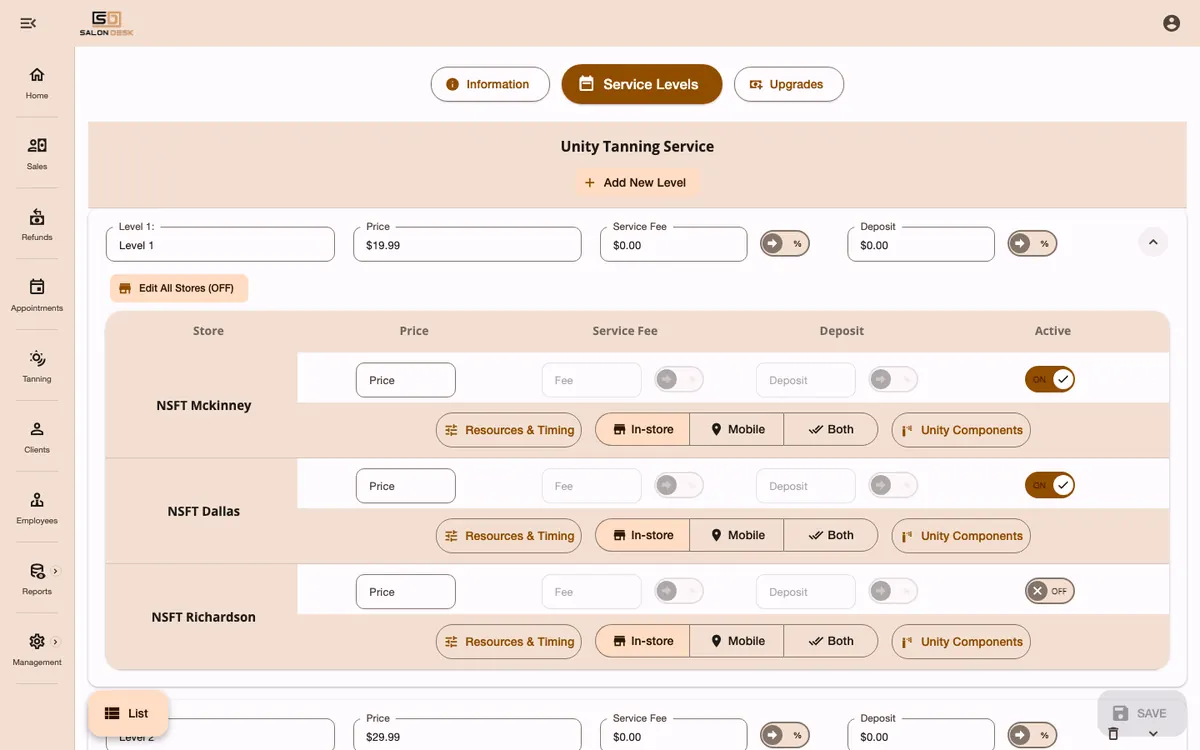
Levels and upgrades carry their own prices, and the system knows which beds a given client is actually entitled to before the session starts.
- Upgrade pricing per level, sold in the booking flow or at the counter.
- Packages and memberships with per-item quantities and expiry.
- Price, fee, deposit and availability override per location.
Tanning salon software questions, answered.
Does SalonDesk connect to tanning bed timers?
Yes, for the T-Max® Touch, the Mystic Tan® Unity® spray booth and the VersaSpa® PRO spray booth, all connected through an API. With the T-Max® Touch, a bed is started and stopped from SalonDesk and its status updates when the session ends. On older timers, use SalonDesk's manual mode: staff start beds by hand on the T-Max® Manager, and SalonDesk uses the computer clock to work out when each session ends (check-in time + pre-tan delay of 2 to 9 minutes + session time + cooldown), then shows the bed as available again. Upgrading to the T-Max® Touch usually needs no rewiring and gives you full control from SalonDesk.
Can it stop a bed being rebooked before it has been cleaned?
Yes. A bed moves through running, done, needs cleaning and ready, and it cannot be booked again until it is marked clean. No session starts on a bed that was not reset.
What happens when every bed is full?
Clients are added to a waitlist automatically and promoted the moment a bed opens, so a busy hour does not turn into people walking out.
Does it handle spray booths as well as UV?
Yes. Unity spray booths are supported, including choosing session type, base tan level, bronzers and scents before the session starts. Add-ons carry their own prices and land on the ticket.
Can I price tanning levels differently?
Yes. Levels and upgrades are priced individually, and price, service fee, deposit and availability can all be overridden per location.
Does it work for a multi-location tanning chain?
Yes. One catalogue covers the whole chain with per-store overrides, and a single client account works across every location you operate.
T-Max® is a registered trademark of Applied Digital, Inc. Mystic Tan® Unity® and VersaSpa® are trademarks of INNOVÉ Beauty & Wellness (formerly Sunless, Inc.). All other trademarks are the property of their respective owners. Nichesoft LLC is not affiliated with, sponsored or endorsed by these companies.
See it running your floor.
A 20-minute walkthrough of bed status, timers, spray booths and checkout — using your service menu, not a generic demo account.
 English (United States)
 English (UK)
 English (Canada)
 English (New Zealand)
 English (South Africa)
 French (Canada)
 French (France)
 German
 Spanish (Mexico)
 Spanish (Spain)